
Next month's diary, filled by last year's customers.
The cheapest customer to win is one you already have. A car that had tyres from you last autumn will need them checked this autumn, and a car serviced in March needs a service next March. This guide shows how to set up service reminders during the trial, so those dates are tracked for every vehicle on your books and a reminder goes out on time, by email or text, with a link that books the customer straight back in.
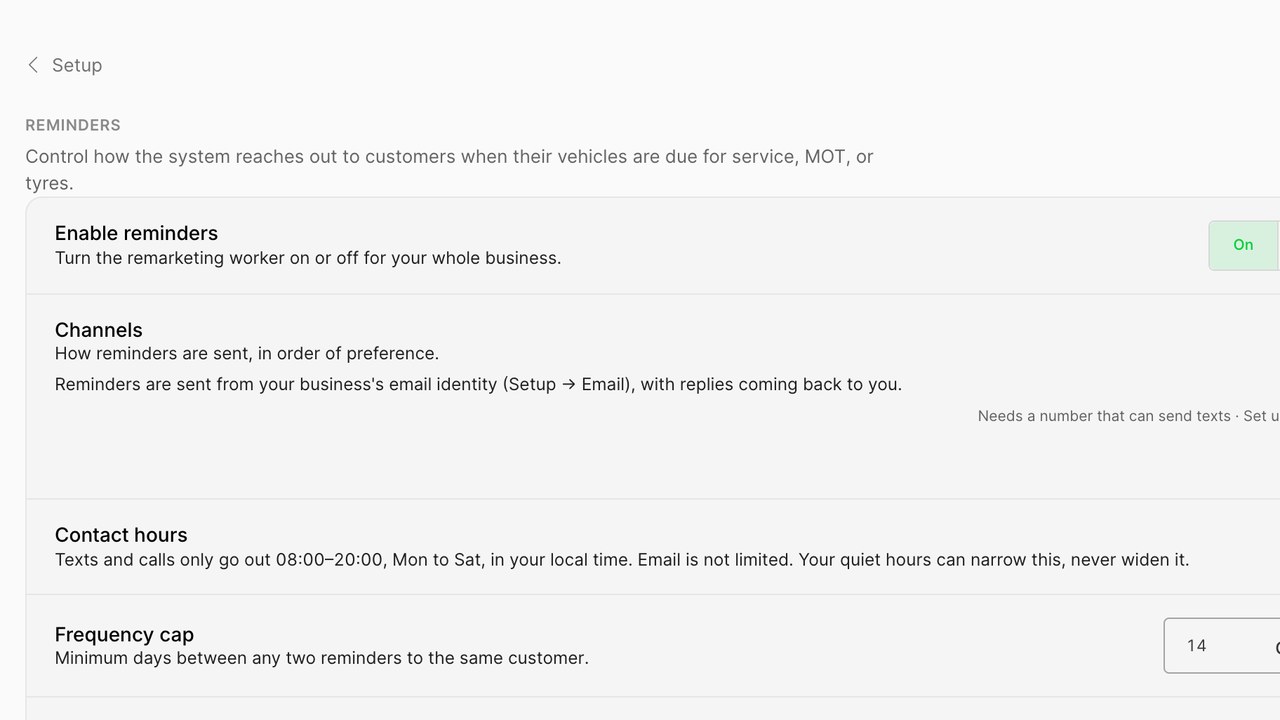
Where the dates come from
Every job you do records what was done to which vehicle on which day. From that, the workspace knows when the next service is due, when the annual test falls, and when the tyres fitted last year are a year old. For vehicles looked up by registration, the test due date comes from the lookup where your country provides it.
You do not type any of this in. Doing jobs is what builds the reminder list, which is why creating real jobs during the trial matters: each one is a customer who will be reminded next year.
Open Reminders and switch on the milestones you want
In Setup, choose Reminders. The panel lists the milestones the workspace can track: annual test due, service due, tyres fitted a year ago, seasonal tyre change where that applies in your market, and a brake or battery check interval if you want one. Switch on the ones that suit your business.
For each one, set how far ahead the reminder goes. Four weeks before a test due date is typical, two weeks for a service, and a month for tyres. The reminder arrives early enough to book and late enough to be relevant.
Choose the channel and the wording
Reminders go by email, by text, or both. Text gets read; email carries more detail. Many workshops send a text with a booking link and an email a few days later if the customer has not booked. Set that order in the panel.
- The wording is a short template with the vehicle and the date filled in. Edit it to sound like you; two sentences is plenty.
- Every reminder carries a booking link that opens your storefront with the vehicle already selected.
- A customer who books is not reminded again for that milestone. A customer who does not is reminded once more, then left alone.
Bring in customers you already have
If you have a list of customers and vehicles from a previous system or a spreadsheet, import it from the Customers tab. Registration, name and mobile number are enough. The workspace looks up each vehicle, finds the test due date where it can, and adds the vehicle to the reminder register from the first import.
A workshop with five hundred vehicles on file has five hundred reminders waiting to go out over the next year, before a single new customer walks in.
Respect the customer's choice
Every text and email carries a way to stop. A customer who opts out is marked on their record and is not reminded again, for any milestone, until they ask. A bounced email or a dead number is marked too, so you can see which records need a fresh number next time the customer is in.
The panel shows the register: who is due, what was sent, who booked. It is the quietest report in the workspace and one of the most valuable.
Time the reminders around your diary
A reminder that lands when you have no slots is a customer sent to someone else. The reminder panel reads your schedule, so you can choose to send tyre and service reminders only when the next fortnight has space, and to hold them back for a few days when the diary is already full.
Seasonal reminders, where your market changes tyres twice a year, can be pinned to the weeks you choose rather than the date the tyres were fitted, so the whole customer list is invited in the fortnight before the rush rather than on the day of it. For a mobile fitter, reminders can be grouped by area, so customers in the same part of town are invited in the same week and the van spends less of the day driving between them.
None of this needs attention once set. It is a few switches in the panel that shape when the trickle arrives.
What to expect
Reminders do not produce a rush. They produce a steady trickle of bookings from people who were going to need the work anyway and would otherwise have gone wherever was nearest on the day. Over a year that trickle is a meaningful share of the diary, and it costs nothing beyond the texts.
Switch them on in the trial, import what you have, and let them run. The first reminder goes out on its own on the day it is due.
Yleisimmät kysymykset
Where do the due dates come from?
From the jobs you do and, for the annual test, from the vehicle lookup where your country provides the date. Nothing is typed in by hand.
Can I remind customers from my old system?
Yes. Import them from the Customers tab with registration, name and mobile number, and their vehicles join the reminder register straight away.
How many reminders does a customer get?
One per milestone, then one follow-up if they have not booked, then nothing until the next milestone. Customers who book are not reminded again.
What if a customer does not want reminders?
Every message carries a way to stop. An opted-out customer is marked on their record and not contacted again until they ask.
Do reminders cost anything?
Email reminders are included. Text reminders use your messaging balance at the per-message rate shown in the panel.
Lue lisää tällaisista
Rengashinnat ilman taulukkoa
Käsin hinnoittelu vanhenee heti, kun toimittajalista muuttuu. Hinnoittele säännöillä ja anna sääntöjen päivittää.
Ajoneuvon rekisteritietojen haku
Rekisteritietojen haku poistaa suurimman esteen verkkorengasmyyntiin: hetken, jolloin kysyt asiakkaalta tuntematonta kokoa.
EU:n rengasmerkintä myymälässäsi
EU:n rengasmerkintä on velvoite ja myyntityökalu. Tässä mitä liikkeen on näytettävä, mistä tiedot tulevat ja miten niitä käytetään kaupassa.