
Ask it the way you would ask a colleague.
Every workspace comes with an agent that knows your jobs, your prices, your customers and your diary, and answers in plain words. It is not a chatbot bolted on the side; it can look things up, draft a quote, build a report and change a price when you tell it to. This guide shows how to use your AI agent during the trial, with the questions that are worth asking first and the ones to be careful with.
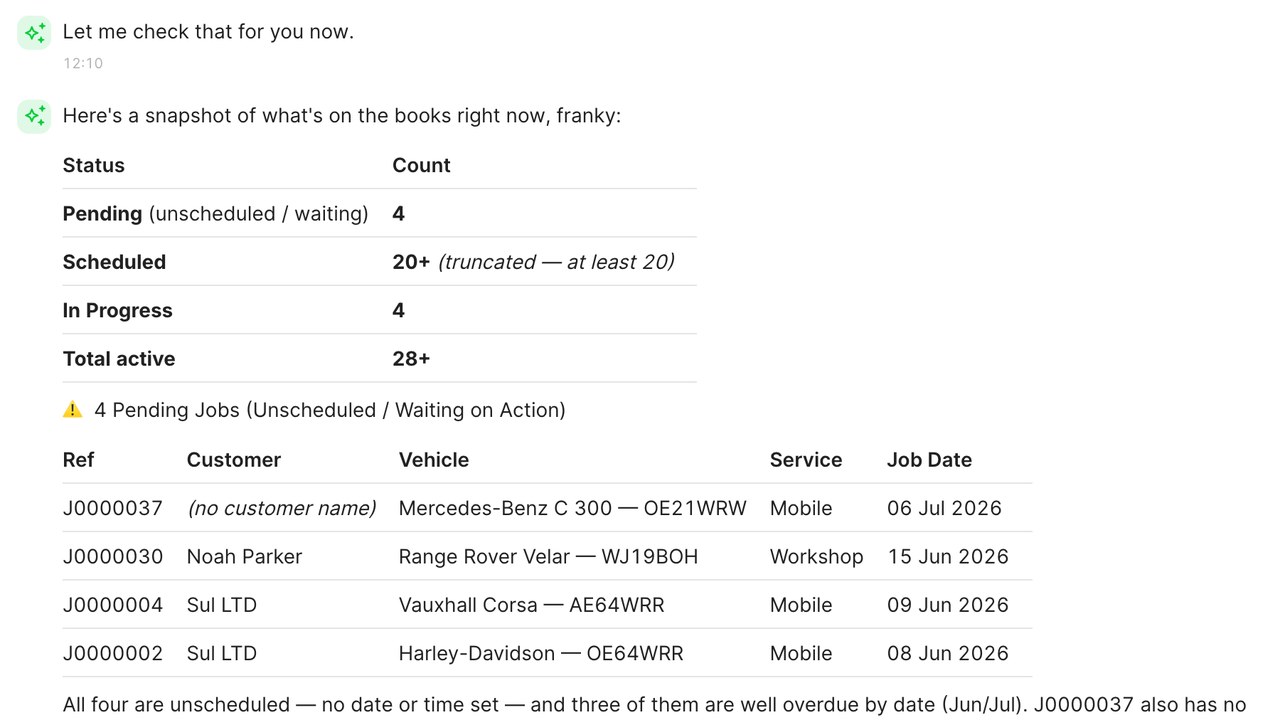
Open the agent and ask about today
The agent panel is on every screen of the workspace. Open it and ask something you already know the answer to: "what is booked for tomorrow", "how many jobs did we do last week", "what did we charge Sra. García for her tyres". It answers from your data, with the jobs or customers it used shown underneath so you can check.
That first question is a calibration. It shows you the agent reads the same workspace you do and does not invent a job that is not there.
Let it do the looking up
The agent is quickest at the things that take you three clicks: find a customer by half a name, pull the tyre sizes for a registration, check whether a size is in stock or on order, show every unpaid invoice older than a month. Ask in a sentence and it brings the answer and a link to the record.
- "Which customers had tyres from us last October" is a reminder list you could send today.
- "What is our margin on premium tyres this month" is a report you did not have to build.
- "Show me jobs that ran over their slot last week" is a conversation to have with the team.
Let it draft, and you decide
Ask the agent to draft a quote for a customer who rang about brakes and a service, and it builds the lines from your service menu at your prices for that vehicle, ready for you to send or change. Ask it to write a reply to a customer email, a note for a job, or the text of a reminder, and it writes in plain words you can edit.
Anything it drafts is a draft. It does not send a quote or an email until you say so. The habit to build is: ask, read, adjust, send.
Let it change things, carefully
The agent can make changes when you ask: move a booking, add a note to a job, apply a price rule across the range, mark a job complete. Each change is shown before it happens and recorded afterwards with who asked for it. Permissions apply to the agent the same way they apply to people: a fitter asking the agent to change prices gets the same answer a fitter would get from the Prices screen.
Start with small changes and read what it did. Within a few days most people trust it with the routine ones and keep the pricing decisions for themselves.
Use it from where you already work
The agent is in the workspace, in the Fixer app, and can be connected to the AI tools you already use on your phone or desktop, so you can ask about tomorrow's diary from wherever you are. The connection is made once in Settings and uses the same permissions as your login.
For a mobile fitter, asking the agent for the next job's address while driving is the kind of small thing that adds up over a week.
Questions worth asking in the first week
The fastest way to learn what the agent can do is to ask it the questions you would otherwise answer by clicking around. Try these in the first week:
- What is unpaid and more than two weeks old?
- Which tyre sizes did we fit most last month?
- Draft a reminder text for customers whose annual test is due next month.
- Move the ten o'clock booking on Thursday to eleven and let the customer know.
- What did we earn per bay last week?
- Which jobs this week have no photos on them?
Each of those is a thing you can do by hand. The agent is for doing them without stopping what you were doing.
What it will not do
It will not set your pricing policy, decide which jobs to take, or talk to a customer without you. Those are your decisions. It will not make up an answer when the data is not there; it says so, and shows you what it did find. During the trial, the best use of it is as a fast pair of hands on the typing, the lookups and the reports, which is where most of the hours go.
Preguntas frecuentes
Does the agent know my data or just general answers?
Your data. It reads the jobs, customers, prices and diary in your workspace, and shows the records it used under each answer so you can check.
Can it send a quote or an email without me?
No. Anything it drafts waits for you to read and send. Changes it makes are shown first and recorded with who asked.
Can my fitters use it?
Yes, within their permissions. A fitter asking about their jobs gets answers; a fitter asking to change prices is told that needs a manager, the same as the screen would.
Does it cost extra?
A monthly allowance of agent use is included in your plan and shown on the plan page. Beyond that it uses credits at the rate shown there.
Can I use it from outside the workspace?
Yes. Connect it once in Settings to the AI tools you already use on your phone or desktop, and ask about your workspace from there.
Lee más como esto
Precios de neumáticos sin hoja de cálculo
Los precios manuales de neumáticos se desactualizan al cambiar la lista de proveedores. Precia por reglas y deja que se actualicen solas.
Consulta de matrícula
La consulta de matrícula elimina la mayor pérdida en ventas online de neumáticos: cuando pides a un cliente un tamaño que no conoce.
La etiqueta de neumáticos de la UE en tu tienda
La etiqueta de neumáticos de la UE es obligatoria y una herramienta de venta. Aquí lo que debe mostrar un taller, de dónde proviene la información y cómo usarla para mejorar las ventas.