
A service menu that books itself.
Tyres bring customers to your storefront. Services are what keep them coming back, and most workshops earn more from a service menu than from the tyres that first brought the car in. This guide shows how to list your services during the trial with a fixed price for each, so a customer can book a brake check, an oil change or a full service without ringing for a quote, and so the price on the booking is the price on the invoice.
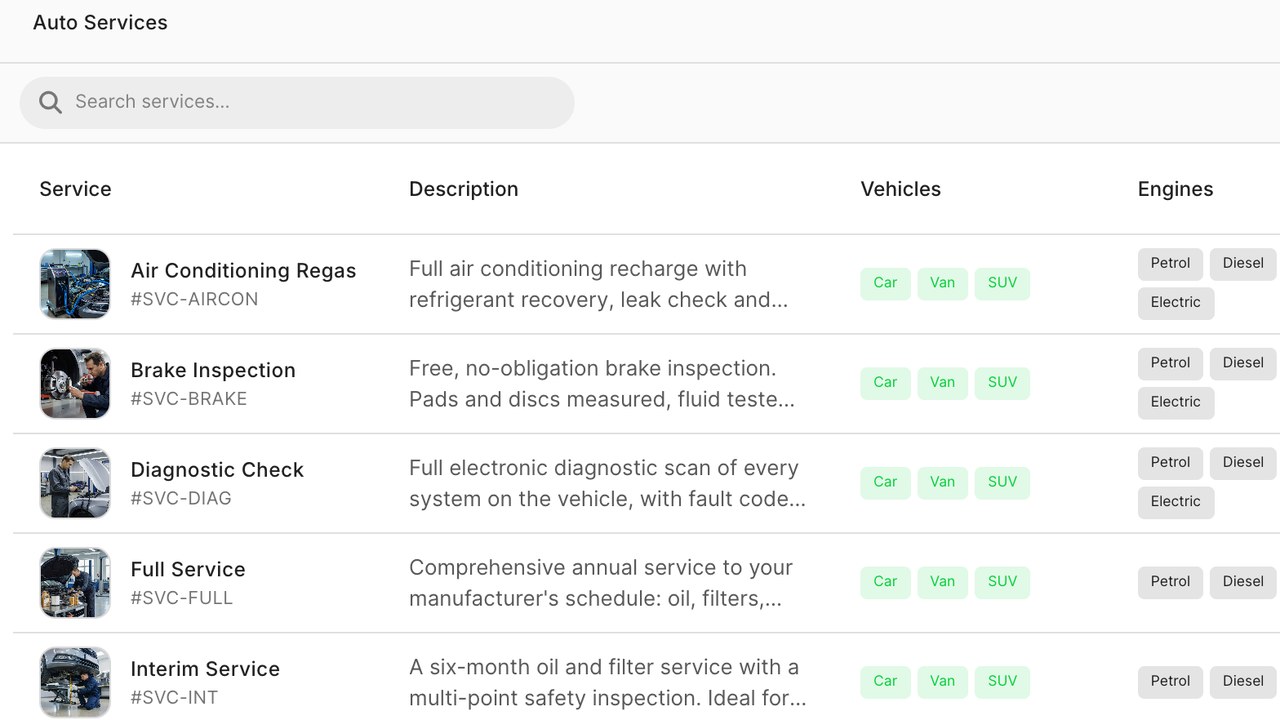
Start with the ten services you actually sell
Open Services in your workspace. It is tempting to build a menu of fifty items. Resist it. Start with the ten jobs you do most weeks: interim and full services, brake pads and discs, wheel alignment, a battery, a diagnostic hour, an air conditioning service, a puncture repair, a wheel balance, an annual test if you offer it. You can always add more later, and a short menu converts better than a long one.
For each one, give it the name a customer would use, not the name on your supplier invoice. "Full service" beats "Schedule B maintenance" every time.
Give every service one fitted price
The price you enter is what the customer pays. It includes labour, the usual parts and fluids, and the tax your country requires on the service. Customers compare what they will actually pay, and a low headline with extras added at the counter reads as a trap. One honest number wins more bookings and causes fewer arguments.
Where a job genuinely varies by vehicle, such as a full service on a small hatchback versus a large diesel van, create two services rather than one service with a range. A range is a quote; two prices are two bookings.
- Set a duration for each service as well as a price. The schedule uses it to offer realistic slots.
- Mark which services can be done at the roadside and which need the workshop, if you do both.
- Attach a short line of what is included. Three items is enough; a customer wants reassurance, not a checklist.
Price by vehicle class where it matters
Some services cost you more on bigger vehicles. The Services panel lets you set a price per class: small car, large car, van. A customer who looked up their vehicle by registration is shown the price for their class without being asked, so a van owner sees the van price and a hatchback owner sees the smaller one.
Use this sparingly. Most services carry one price for everyone, and that simplicity is part of what makes online booking work. Reserve the per-class prices for services where the difference is real and you would otherwise lose money on the bigger vehicle.
Decide what goes on the storefront and the customer network
Every service has a switch for the storefront and a switch for the Requex customer network. Most workshops show everything on their own site. On the network, show the services you are happy to take from a new customer at the listed price, which is usually the simpler jobs: tyres, brakes, batteries, servicing.
A diagnostic hour is a good thing to list on the network because it gives a customer with a warning light a way in. Deeper repairs are usually better quoted after you have seen the car, and the network has a quote flow for exactly that.
Test a booking the way a customer would
Open your storefront, look up a registration, and book one of the services you just listed. You should see the right price for the vehicle class, a slot that matches the duration you set, and a confirmation that names the service. In the workspace, the booking arrives as a job with the service, the price and the time already on it.
If the slot picker offers times that feel too short or too long, the duration is wrong, not the schedule. Fix it on the service and the next booking offers the right slot.
Keep the menu honest as you go
Prices change. When they do, change them here and nowhere else, because the place you list your services is the one source every surface reads; the storefront, the network and new jobs all read from this list. Old jobs keep the price they were booked at, so a change never surprises a customer who booked last week.
Once a month, look at the services report: which ones were booked, which were quoted but not booked, and what they earned. A service nobody books in three months is either priced wrong or named wrong. Either is a two-minute fix.
Preguntas frecuentes
How many services should I list to start?
About ten, the jobs you do most weeks. A short menu with clear fixed prices converts better than a long one, and you can add services at any time.
Should the price include parts and tax?
Yes. Enter the fitted price the customer pays, with the usual parts, fluids and tax included, so the booking price is the invoice price.
Can I charge more for vans or large cars?
Yes. Set a price per vehicle class on the services where the cost difference is real. A customer who looked up their registration sees the price for their class automatically.
What about repairs I need to see first?
Keep those off the fixed-price menu and use the quote flow. List a diagnostic hour instead, so a customer with a fault still has a way to book you.
Do existing bookings change when I change a price?
No. A job keeps the price it was booked at. New bookings and the storefront use the new price from the moment you save it.
Lee más como esto
Precios de llantas sin hoja de cálculo
Los precios de llantas a mano se desactualizan al cambiar la lista de proveedores. Usa reglas para fijar precios y deja que se actualicen automáticamente.
Consulta de registro vehicular
La consulta de registro vehicular elimina la mayor caída en ventas de llantas en línea: cuando preguntas a un cliente por un tamaño que no conoce.
La etiqueta de llantas de la UE en tu tienda
La etiqueta de llantas de la UE es una obligación y una herramienta de ventas. Aquí lo que debe mostrar un taller, de dónde proviene la información y cómo usarla para mejorar las ventas.